ISBN numbers are the international order numbers for books. ISBN stands for International Standard Book Number.
An ISBN barcode is created using the EAN-13 symbology with a special prefix, for example the prefix 978. 13-digit ISBNs are prefixed with "978" (and the check digit recalculated); as the "978" ISBNs are exhausted, the "979" prefix will be introduced.
iWinSoft provide the most comprehensive and easy to use ISBN barcode software for Windows and Mac platforms that allows you to create and print ISBN barcode. It's quite easy to generate the ISBN barcodes. even if you are a newbie to barcodes. Simply select the ISBN Revised barcode type, and enter your barcode data.
Note: Please do not type prefix 978 or 979, because it is entered automatically.
ISBN Barcode Generator Features and Functions:ISBNs need to be converted into Bookland EAN barcodes (See Ex.2 below) for proper scanning in retail stores. The first three digits of the Bookland EAN, 978, are given to every ISBN to uniquely identify the barcode as a book or book related product. The next nine digits of the EAN consist of the ISBN (minus the check digit). Finally, a new check digit will be calculated for your EAN, which is based on the first 12 digits of the EAN number. The ISBN is printed above the barcode so that it can be manually entered, if needed.
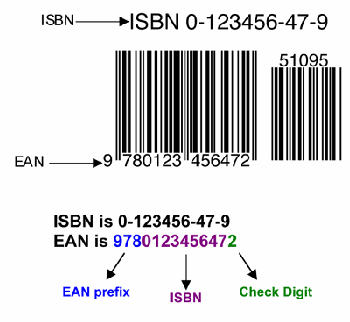
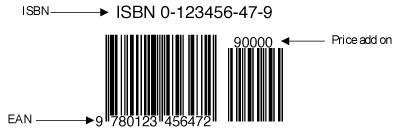
Yes, price codes are mandatory for most retailers in the United States. The five digit add-on encodes the suggested retail price of your book into the barcode. In the United States, the first digit of the add-on is the number 5, which indicates U.S. dollars. The remaining 4 digits encode the price without decimals (Ex.3). If the price is greater than $99.99, the add-on should remain as 59999. If there is not a set price, a code of 90000 tells the computer that there is no suggested retail price associated with the EAN code (Ex.4).
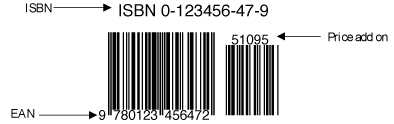
Example 2: Price add on with price of $10.95
Your book's ISBN is 0-123456-47-9 and retails for $10.95
Your EAN will be 9780123456472 with a price add on code of 51095